
Getting Started
Using the Results API (v2)
Introduction
The Results API is a set of endpoints that can help you analyze and gather in-depth data from test and session results.
Use cases include:
- automated research pipelines
- real-time action triggers and insight delivery
- AI analysis and insight generation
- custom dashboards and internal UX portals
Tip: For non-technical users, checkout the following resources:
- Not a Developer?: An introduction for non-technical users
- Walkthrough video : guides you through the main technical aspects of each endpoint
- FAQs: technical questions answered in simple language
- Knowledge Base | Results API: Knowledge Base article introducing the Results API.
Compatibility
The Results API (v2 & v3) works only on the latest test types and the sessions associated with them.
Use the response from the /v1/workspaces/WORKSPACE_UUID endpoint to find compatible tests, i.e., tests (studies) with a type property set to STUDYV2.
Compatible tests include:
| Test type (UI name) | type (API - property value) | productType (API - property value) |
|---|---|---|
| surveys | STUDYV2 | SURVEY |
| interaction tests | STUDYV2 | NON_THINK_OUT_LOUD |
| think-out-loud (beta) | STUDYV2 | THINK_OUT_LOUD |
| live conversation | STUDYV2 | LIVE_CONVERSATION |
Attention: Classic UserTesting tests and their resources are NOT available via the Results API (v2).
These tests include:
Live Conversation (Classic), Video Upload (Classic), Prototype Test, App Test, and Web Test.Use legacy endpoints (v1) to access classic UserTesting data.
Overview of test and session results
Within the UserTesting platform, companies receive an account to manage their data. Each account is divided into workspaces to organize data by category. The company grants team members access by workspace. Team members create tests, which are a set of questions or tasks, within each workspace. These tests are then given to participants to answer. Each participant’s interaction with a test is a session. Participants are also grouped into audiences.
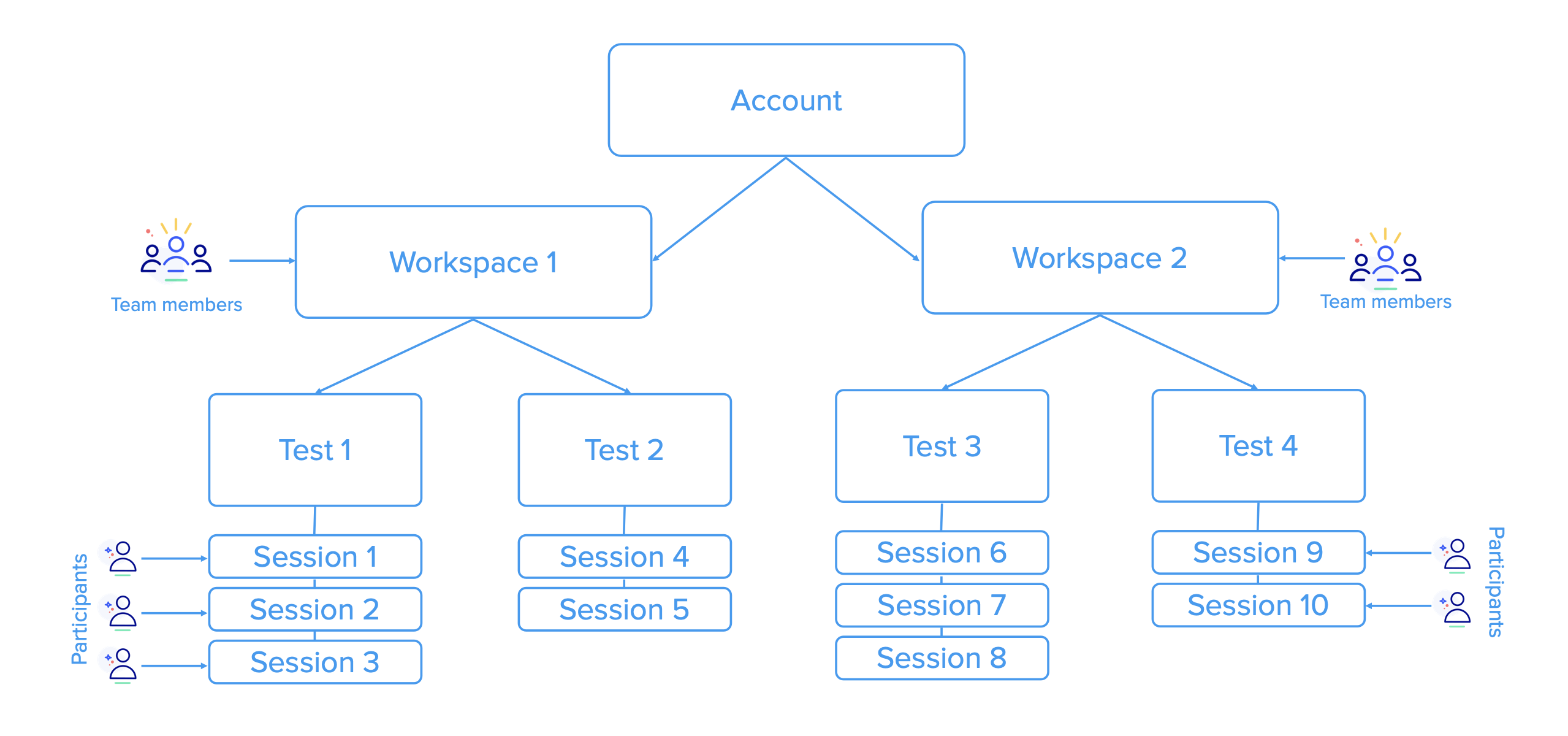
Resource diagram
Scope of the Results API
Since your client credentials are associated with your email address, the Results API gives you access to the data within the workspaces where your email is used to register you as a team member.
Within the workspaces you have access to, you will be able to fetch the following data from these test types:
- Surveys, live conversations, interaction tests, and think-out-loud tests:
- Get a list of all sessions within a test.
- Retrieve session details, such as participant demographics and task responses.
- Live conversations:
- Get video transcripts
- Obtain link to session videos
- Interaction tests:
- Obtain QXscores, which are a measure of participants' experience within each session.
- Obtain link to session videos
- Think-out-loud (beta):
- Get video transcripts
- Obtain link to session videos
Prerequisites
-
Obtain an access token for a user in the workspace you want to work in (
ACCESS_TOKEN). Go to the Authorization page for details. -
Obtain the universally unique identifier (UUID) of a test (
TEST_ID). Go to How to Obtain a Test ID (UUID) for details.
After obtaining the required values for ACCESS_TOKEN and the TEST_ID mentioned in the prerequisites, you’re ready to start working with session and test data.
Base URL
Each of the Results API endpoints uses the following base URL:
https://api.use2.usertesting.com
General session data
Fetch all sessions in a test
Summary
| Endpoint | Required UUID | Test (Study) Type | Product Type | Response |
|---|---|---|---|---|
GET /api/v2/sessionResults?testId | TEST_ID | STUDYV2 | ALL PRODUCT TYPES ARE COMPATIBLE | list of sessions within a test |
Let’s begin by getting a list of all the sessions within a test.
Use the testId as a query parameter in the session results endpoint.
Best Practice: Always use pagination query parameters (
limitandoffset) along with the appropriate logic to ensure all sessions are retrieved.
- Use the response data from
limit,offset, andtotalCountin themeta.paginationproperty to calculate the number of page iterations needed to collect all sessions in the test.- By default,
limitis set to25andoffsetto0.- In the response, sessions are sorted in descending order, i.e., from newest to oldest.
Request example (with pagination defaults)
curl --request GET \
     --url 'https://api.use2.usertesting.com/api/v2/sessionResults?testId=TEST_ID' \
     --header 'Accept: application/json' \
     --header 'Authorization: Bearer ACCESS_TOKEN'
Response sample
{
  "testId": "TEST_ID",
  "sessions": [
    {
      "sessionId": "SESSION_ID_00",
      "audienceId": "AUDIENCE_ID_00",
      "status": "COMPLETE",
      "startTime": "2024-11-21T12:23:52.614Z",
      "finishTime": "2024-11-21T12:25:03.347Z"
    },
    {
      "sessionId": "SESSION_ID_01",
      "audienceId": "AUDIENCE_ID_00",
      "status": "COMPLETE",
      "startTime": "2024-11-21T12:28:10.112Z",
      "finishTime": "2024-11-21T12:31:05.203Z"
    },
  ],
  "meta": {
    "pagination": {
      "limit": 25,
      "offset": 0,
      "totalCount": 2
    }
  }
}
Response handling
From the response, grab a session ID from any sessions[ ].sessionId property.
You can then use the sessions[ ].sessionId value as a path parameter on the other session results endpoints to do the following:
Retrieve session details
Summary
| Endpoint | Required UUID | Test (Study) Type | Product Type | Response |
|---|---|---|---|---|
GET /api/v2/sessionResults/SESSION_ID [DEPRECATED] | SESSION_ID | STUDYV2 | ALL PRODUCT TYPES ARE COMPATIBLE | session details |
GET /api/v3/sessionResults/SESSION_ID | SESSION_ID | STUDYV2 | ALL PRODUCT TYPES ARE COMPATIBLE | session details |
If you need in-depth session details, such as session metadata, participant demographics, or task results, use the session ID as a path parameter in the sessionResults endpoint.
- GET /api/v3/sessionResults/SESSION_ID
Request example
curl --request GET \
     --url https://api.use2.usertesting.com/api/v3/sessionResults/SESSION_ID \
     --header 'Accept: application/json' \
     --header 'Authorization: Bearer ACCESS_TOKEN'
curl --request GET \
--url https://api.use2.usertesting.com/api/v2/sessionResults/SESSION_ID \
--header 'Accept: application/json' \
--header 'Authorization: Bearer ACCESS_TOKEN'Response sample
{
  "sessionId": "f3c00502-256d-4693-b1b3-7dbd7eb64ca9",
  "audienceId": "550e8400-e29b-41d4-a716-446655440000",
  "testPlanId": "6ba7b810-9dad-11d1-80b4-00c04fd430c8",
  "sessionParticipant": {
    "participantId": "41f72104-5f84-44fa-a16a-03f575159611",
    "demographicsInfo": [
      {
        "id": "3f1b8c2e-9a44-4c3d-b8b7-1a7f4c0a9d21",
        "code": "GENDER",
        "label": "What is your gender?",
        "value": "Male",
        "type": "DEMOGRAPHIC_QUESTION_TYPE_SINGLE"
      }
    ]
  },
  "taskGroups": [
    {
      "uuid": "550e8400-e29b-41d4-a716-446655440000",
      "type": "QX_SCORE",
      "response": {
        "score": 85
      }
    }
  ],
  "tasks": [
    {
      "uuid": "12debc51-0948-4d2e-9abe-9844ddd5c5ff",
      "text": "Rate Website A",
      "type": "RATING_SCALE",
      "response": {
        "startTimeMs": 15000,
        "endTimeMs": 20000,
        "skipped": false,
        "answer": {
          "blank": {},
          "ratingScale": {},
          "multipleChoice": {},
          "image": {},
          "nps": {},
          "url": {},
          "rankOrder": {},
          "written": {},
          "figma": {},
          "matrix": {}
        }
      }
    }
  ]
}
{
  "sessionId": "SESSION_ID",
  "audienceId": "AUDIENCE_ID",
  "testPlanId": "TEST_PLAN_ID",
  "sessionParticipant": {
    "participantId": "PARTICIPANT_ID",
    "demographicsInfo": [
      {
        "id": "DEMOGRAPHICS_ID",
        "code": "GENDER",
        "label": "What is your gender?",
        "value": "Male",
        "type": "DEMOGRAPHIC_QUESTION_TYPE_SINGLE"
      }
    ]
  },
  "sessionTaskResults": [
    {
      "taskId": "TASK_ID",
      "taskType": "TASK_TYPE_RATING_SCALE",
      "taskResponse": {
        "ratingScaleSpecificFields": {
          "uuid": "RATING_ID",
          "text": "How satisfied are you with our service?",
          "value": "4"
        }
      }
    }
  ]
}
Video data
Retrieve a video transcript
Summary
| Endpoint | Required UUID | Test (Study) Type | Product Type | Response |
|---|---|---|---|---|
GET /api/v2/sessionResults/SESSION_ID/transcript | SESSION_ID | STUDYV2 | Only for sessions found within LIVE_CONVERSATION and THINK_OUT_LOUD product types | transcript of session video recording |
To analyze what participants say during a think-out-loud test or live conversation (non-classic version), you can retrieve the entire video transcript in WebVTT format using the session ID on this endpoint:
Request example
curl --request GET \
     --url https://api.use2.usertesting.com/api/v2/sessionResults/SESSION_ID/transcript \
     --header 'Accept: text/vtt' \
     --header 'Authorization: Bearer ACCESS_TOKEN'
Response sample
WEBVTT

00:00:00.000 --> 00:00:02.000
Hello, World!

00:00:02.000 --> 00:00:04.000
This is a VTT example
Obtain a video download link
Summary
| Endpoint | Required UUID | Test (Study) Type | Product Type | Response |
|---|---|---|---|---|
GET /api/v2/sessionResults/SESSION_ID/videoDownloadUrl | SESSION_ID | STUDYV2 | Only for sessions found within LIVE_CONVERSATION, NON_THINK_OUT_LOUD, and THINK_OUT_LOUD product types | transcript of session video recording |
You can get links to download session videos of live conversations, interaction tests, and think-out-loud tests to help you make clips or video summaries for stakeholders to watch by using the session ID on this endpoint:
Request example
curl --request GET \
     --url https://api.use2.usertesting.com/api/v2/sessionResults/SESSION_ID/videoDownloadUrl \
     --header 'Accept: application/json' \
     --header 'Authorization: Bearer ACCESS_TOKEN'
Response sample
{
  "videoUrl": "VIDEO_URL",
  "sessionId": "SESSION_ID",
  "expiresAt": "2025-10-01T12:00:00Z"
}
Coming soon!Endpoints to fetch clips and highlight reels will soon be available.
QXscore data
Summary
| Endpoint | Required UUID | Test (Study) Type | Product Type | Response |
|---|---|---|---|---|
GET /api/v2/testResults/TEST_ID/qxScores | TEST_ID | STUDYV2 | NON_THINK_OUT_LOUD | test QXscore |
Interaction tests gather QXscore data. You can obtain the QXscore by using the test ID on this endpoint's path:
Request example
curl --request GET \
     --url https://api.use2.usertesting.com/api/v2/testResults/TEST_ID/qxScores \
     --header 'Accept: application/json' \
     --header 'Authorization: Bearer ACCESS_TOKEN'
Response sample
{
  "testId": "TEST_ID",
  "qxScores": [
    {
      "taskGroupId": "TASK_GROUP_ID",
      "label": "QXscore 1",
      "qxScore": 38,
      "components": {
        "behavioral": 25,
        "attitudinal": 50
      },
      "values": {
        "behavioral": [
          50,
          50
        ],
        "usability": 50,
        "trust": 50,
        "appearance": 50,
        "loyalty": 50
      }
    }
  ],
  "meta": {
    "totalQxTasks": 1,
    "completes": 2
  }
}
Further resources
Go to the Tutorials section to explore use case implementations.
Updated 5 months ago